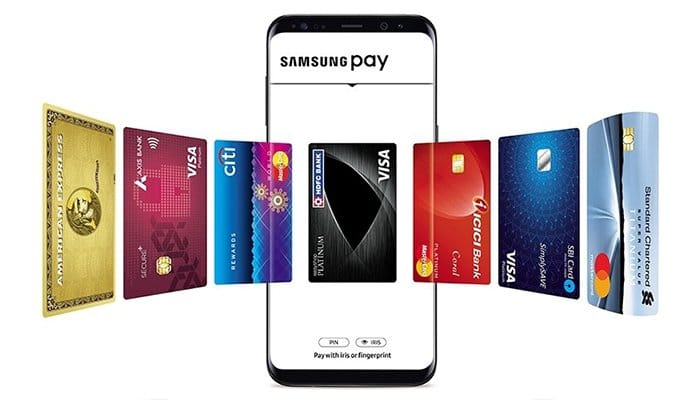
Samsung Pay is a mobile payment app enabling quick and secure online casino deposits and withdrawals. Turn your phone into a wallet by adding your favorite credit and debit cards. Make payments anytime, anywhere.
If you prefer playing your favorite casino games on the go, you can do it on your smartphone. You no longer need to download dedicated casino apps. The games now use HTML5, making them easily accessible via mobile browsers. You can even enjoy playing live casino games as they too are mobile-friendly. Mobile casinos are optimized for modern devices and go hand in hand with mobile payment methods.
One such convenient phone banking service is Samsung Pay. As the name implies, Samsung Pay is compatible with Samsung Galaxy phones and other similar devices. Samsung Pay casinos allow you to use this mobile e-wallet as a deposit and withdrawal method.
What is Samsung Pay?
Samsung Pay is an e-wallet that allows you to make secure and simple mobile payments. This payment app turns your Samsung phone or smartwatch into a digital wallet. You can use your Galaxy devices to make online and offline payments with your credit and debit cards. Also, you can make direct in-app payments and even international wire transfers.
With Samsung Pay, you can leave your physical wallet at home and register all your bank, gift, and membership cards on your device. To make payments, launch Samsung Pay and select the card you wish to use on-screen. If you want to make in-app or online transactions, look for the Samsung Pay Checkout button. Samsung Pay is a convenient mobile payment method Samsung has partnered with the most respected financial institutions, payment card networks, and leading banks. Therefore, you can add Visa, Mastercard, American Express, and Discover cards to your Samsung Pay wallet. However, Samsung is continually expanding its list of financial partners. For example, Samsung Pay supports more than 1,000 banks and credit unions in the US.
Samsung Pay Cash also enables you to create your virtual card. You can use it for various transfers or as a virtual prepaid card. You only need to link it to your bank account. It’s worth noting that the availability and policies of the Samsung prepaid card depend on your country of residence.
The app enables contactless transactions thanks to NFC and MST support. Near-field communication (NFC) suits contactless terminals and facilitates tap-to-pay transactions. Samsung Pay also uses MST technology (magnetic secure transmission), making it more widely accepted. MST is compatible with older terminals requiring you to swipe a card.
History
Samsung Pay was launched in 2015 in South Korea. The same year, it became available in the United States. The service is currently available in more than 25 countries worldwide. Some of the countries where you can use Samsung Pay include the US, UK, Canada, Australia, India, China, Spain, Russia, Brazil, Sweden, Switzerland, France, Singapore, and Hong Kong.
If you own one of the newer Samsung mobile phones, you already have the Samsung Pay app installed. If your mobile phone is an older one, you’ll need to download the app and set it up manually.
Some of the devices that feature Samsung Pay include Galaxy S21 5G, Galaxy S21+, Galaxy Note20, Note20 Ultra, Note10 5G, S10, Note9, and Galaxy A32 5G. Supported smartwatches include Gear S2 Sport, Gear S3 Classic, Galaxy Watch, and Galaxy Watch Active2. Keep in mind that Samsung Pay cannot be used with iOS devices. Also, if you wish to use the service with your non-Samsung phone, you need to update to Android 6.0 or higher.
How to set up Samsung Pay on your phone?
If your mobile phone doesn’t have Samsung Pay preloaded, install the app from Galaxy Store or Google Play. Click on Get Started to register a 4-digit PIN and confirm it. You can also add your fingertip and iris scan if you haven’t set up these features on your phone.
Now you need to link your payment cards. Open the hamburger menu in the top left corner and tap Cards. Click on the plus sign and then Add Credit/Debit Card. Follow the on-screen instructions and agree to the card’s T&C. The maximum number of payment cards you can add to your Samsung Pay is 10.
Samsung Pay deposits are straightforward and similar to other e-wallet transactions. Open the casino site and log in. Go to the banking page and open the deposit section. Scroll through the list to find Samsung Pay.
Select it as a deposit method. Enter the amount you want to credit to your online casino account. Sign in to your Samsung account and choose the credit or debit card you wish to use from the Samsung app. You will receive a notification asking you to confirm the payment on your phone.
How to Withdraw with Samsung Pay?
Samsung Pay withdrawals are identical to deposits. Only this time, you need to go to the withdrawal section. Tap on Samsung Pay to select it as your preferred withdrawal method. Enter the amount you want to cash out and choose the bank account you linked to your Samsung Pay app. Submit the withdrawal request.
Samsung Pay transactions are authorized with a PIN, fingerprint, or iris scan. After repeated failure to authenticate, Samsung Pay will erase all card data.
No. Samsung Pay does not have access to your bank accounts.
Transfer Time and Fees
If you decide to deposit with Samsung Pay, the funds will be credited to your casino balance immediately. You can start playing real money games right away. Speaking of withdrawals, cashing out with Samsung Pay is hassle-free. But, the waiting time is longer. First, the casino accounts department needs to review and approve your withdrawal request. Casino pending timeframes can vary from one casino to another. Usually, pending periods won’t take longer than 48 hours. However, since you’ll be withdrawing funds to your bank account, the waiting time will also depend on your bank. In most cases, Samsung Pay withdrawals can take 3 to 5 business days.
Samsung Pay doesn’t charge anything for payments from the app. Still, you need to know that your bank may apply fees for processing these transactions. Online casinos also don’t charge players for using Samsung Pay as a deposit and withdrawal method. But, we advise you to read the casino’s T&C and double-check the banking page.
Security
Samsung Pay has several added layers of security that safeguard all your payment information from any third party. It features a built-in Samsung Knox technology that provides continuous monitoring for signs of any malicious attack. Each payment with Samsung Pay is covered by fraud protection measures used by your bank. The service itself offers authentication via PIN, fingertip, or iris scan. It’s important to say that Samsung Pay doesn’t have access to your bank account. Finally, the card information is fully encrypted within a separate data vault. If you lose your smartphone, you can deactivate or lock the service remotely with Find My Mobile.


 Nederlands
 Deutsch
 Svenska
 Polski
 Suomi
Suomi Español
 Français
 Português
 العربية
 Bahasa Melayu
 Italiano
 ไทย
ไทย Türkçe
 日本語
日本語 Български
 Română
 Ελληνικά
 Dansk
Dansk 简体中文
简体中文 繁體中文
繁體中文 Afrikaans
 Shqip
Shqip አማርኛ
አማርኛ Հայերեն
 Azərbaycan dili
 Euskara
 Беларуская мова
 বাংলা
বাংলা Bosanski
 Català
 Cebuano
 Chichewa
 Corsu
Corsu Hrvatski
 Čeština
 Esperanto
 Eesti
Eesti Filipino
 Frysk
Frysk Galego
 ქართული
 ગુજરાતી
 Kreyol ayisyen
 Harshen Hausa
 Ōlelo Hawaiʻi
 עִבְרִית
 हिन्दी
 Hmong
Hmong Magyar
 Íslenska
 Igbo
Igbo Bahasa Indonesia
 Gaelige
 Basa Jawa
 ಕನ್ನಡ
ಕನ್ನಡ Қазақ тілі
 ភាសាខ្មែរ
 한국어
한국어 كوردی
كوردی Кыргызча
 ພາສາລາວ
 Latin
Latin Latviešu valoda
 Lietuvių kalba
 Lëtzebuergesch
 Македонски јазик
 Malagasy
 മലയാളം
 Maltese
 Te Reo Māori
 मराठी
मराठी Монгол
 ဗမာစာ
ဗမာစာ नेपाली
 Norsk bokmål
 پښتو
پښتو فارسی
فارسی ਪੰਜਾਬੀ
 Русский
 Samoan
 Gàidhlig
 Српски језик
 Sesotho
 Shona
Shona سنڌي
سنڌي සිංහල
සිංහල Slovenčina
 Slovenščina
 Afsoomaali
 Basa Sunda
 Kiswahili
 Тоҷикӣ
 தமிழ்
தமிழ் తెలుగు
 Українська
 اردو
اردو O‘zbekcha
 Tiếng Việt
 Cymraeg
 isiXhosa
 יידיש
יידיש Yorùbá
 Zulu
Zulu