About Hi-Lo Club Live
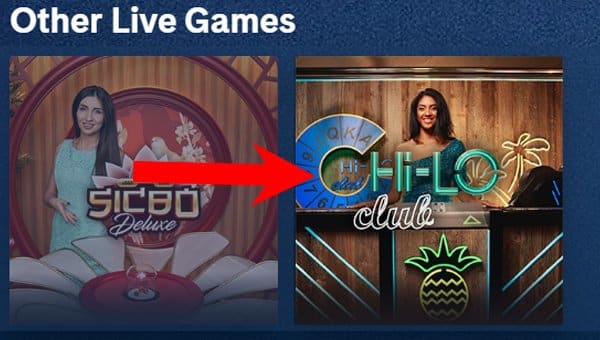
Playtech’s Hi-Lo Club is a 1980’s-themed live game show. Hi-Lo is a popular card game with simple rules and straightforward gameplay. Playtech succeeded in upgrading this easy game into a fun-filled live casino game show set in a glamorous neon studio hosted by live dealers.
The game’s main objective is to predict if the following card to be dealt will have a higher or lower value than the one on the table. And the main advantage is that you get to see the card you’re competing against face-up before deciding where to put your wager.
Yes, it’s as simple as that. However, Playtech spiced things up a bit by adding a few more side bets, making the Hi-Lo Club fun and highly entertaining live casino experience. Moreover, there are no limits on the number of players who can join in, meaning that an unlimited number of gamers can participate in each round.
Game Features & Gameplay
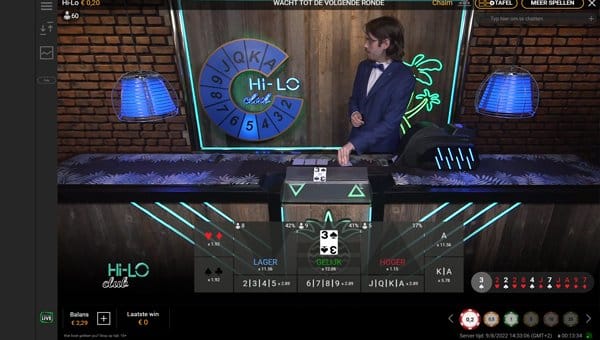
Hi-Lo Club Live is played with six standard decks of cards. The only card that is not part of the game is 10. The most attractive feature is a neon blue dial behind the live host. It constantly ticks back and forth between all card values a dealer can pull from the card shoe.
However, the neon dial is a purely aesthetic addition to the game. Still, its visual and sound effects bring Hi-Lo Club the game-show look & feel. The dial stops when the dealer pulls the cards, and the system scans the one that will be displayed face-up. This card is then highlighted on the dial and presented on the table.
Hi-Lo is a fast-paced card game. The dealer pulls the first three cards from the shoe, and the next card it takes is a base card you will compete against. However, before revealing the base card, the dealer first “burns” the first three cards it pulled from the dealing shoe. “Burning cards” is when a croupier discards the cards from the table that haven’t been revealed and puts them back face-down in the card shoe.
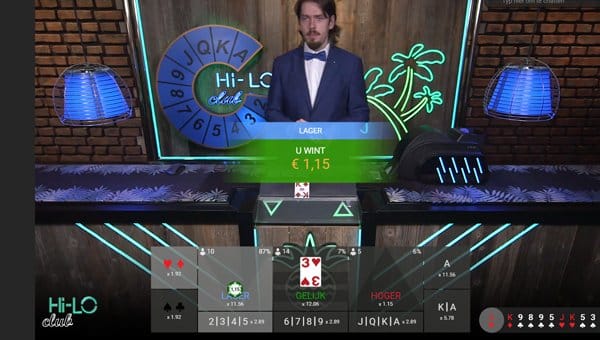
Before you can see the card, you need to make a bet. Your goal is to predict if the following card will be higher or lower than the one on the table. If you guess right, you win, and the new round starts.
Other game features include “Rebet”, allowing you to place the same bet as in the previous round. “Undo” lets you remove the current wagers on the table, and X2 enables you to double the current stakes. Finally, if you wish, you can chat with a live dealer in real-time.
Betting Options
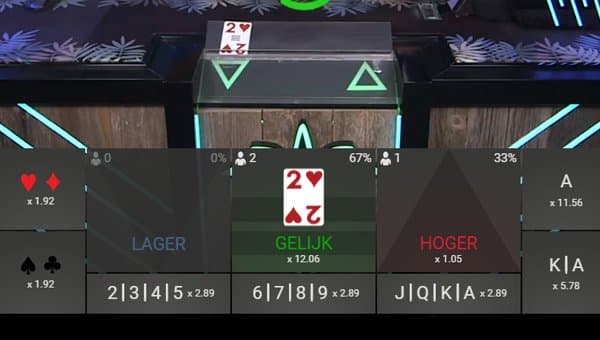
We’ve mentioned earlier that Hi-Lo is one of the easiest table games with straightforward rules. The main bets are “Higher”, “Lower,” and “Snap”. The first two don’t need any additional explanation. However, if you think the next card will have the same value as the one you’re betting against, place the chip on “Snap”. The payouts for betting on “Higher” or “Lower” are not fixed and depend on the base card. The “Snap” pays 12.06x.
Other side bets and their payouts are:
- Red: if you guess the next card is red, the payout is 1.92x
- Black: if you think the next card is black, and you’re right, the payout is 1.92x
- 2, 3, 4, 5: if the card is one of these, the payout is 2.89x
- 6, 7, 8, 9: if the following card has one of these values, you win 2.89x
- J, Q, K, A: payout value is 2.89x
- Ace: if you guess that the next card is Ace, you’ll win 11.56x your bet
- King/Ace: if you predict one of these cards, you’ll be rewarded with 5.78x
Interface
Playtech upgraded the studio to offer a more engaging look and feel with neon palm trees and some pineapples. After updating the setting, the provider rebranded the games into a Hi-Lo Club. The user interface is appealing with the most important functionalities and bets on the betting board. You can load the game in full-screen mode or use the standard view, depending on the quality of your internet connection.
The neon green triangles are straightforward as they visually present the higher or lower card values you wish to bet on. Other UI elements include Rebet, Undo, and X2. If you want to set other audio or visual parameters or see game history, click the hamburger menu at the top left of the screen to open the Settings menu.


 Nederlands
 Deutsch
 Svenska
 Polski
 Suomi
Suomi Español
 Français
 Português
 العربية
 Bahasa Melayu
 Italiano
 ไทย
ไทย Türkçe
 日本語
日本語 Български
 Română
 Ελληνικά
 Dansk
Dansk 简体中文
简体中文 繁體中文
繁體中文 Afrikaans
 Shqip
Shqip አማርኛ
አማርኛ Հայերեն
 Azərbaycan dili
 Euskara
 Беларуская мова
 বাংলা
বাংলা Bosanski
 Català
 Cebuano
 Chichewa
 Corsu
Corsu Hrvatski
 Čeština
 Esperanto
 Eesti
Eesti Filipino
 Frysk
Frysk Galego
 ქართული
 ગુજરાતી
 Kreyol ayisyen
 Harshen Hausa
 Ōlelo Hawaiʻi
 עִבְרִית
 हिन्दी
 Hmong
Hmong Magyar
 Íslenska
 Igbo
Igbo Bahasa Indonesia
 Gaelige
 Basa Jawa
 ಕನ್ನಡ
ಕನ್ನಡ Қазақ тілі
 ភាសាខ្មែរ
 한국어
한국어 كوردی
كوردی Кыргызча
 ພາສາລາວ
 Latin
Latin Latviešu valoda
 Lietuvių kalba
 Lëtzebuergesch
 Македонски јазик
 Malagasy
 മലയാളം
 Maltese
 Te Reo Māori
 मराठी
मराठी Монгол
 ဗမာစာ
ဗမာစာ नेपाली
 Norsk bokmål
 پښتو
پښتو فارسی
فارسی ਪੰਜਾਬੀ
 Русский
 Samoan
 Gàidhlig
 Српски језик
 Sesotho
 Shona
Shona سنڌي
سنڌي සිංහල
සිංහල Slovenčina
 Slovenščina
 Afsoomaali
 Basa Sunda
 Kiswahili
 Тоҷикӣ
 தமிழ்
தமிழ் తెలుగు
 Українська
 اردو
اردو O‘zbekcha
 Tiếng Việt
 Cymraeg
 isiXhosa
 יידיש
יידיש Yorùbá
 Zulu
Zulu